
Webmail is convenient, but many people prefer a desktop or phone mail app: offline access, one inbox for several accounts, and an interface they already know. Neir works with any client that speaks IMAP, POP3 and SMTP, and most clients configure themselves.
Before you start: create an app password
Your Account Key signs you into the website. Mail clients use a separate app password, so a device never holds the key to your whole account. If a laptop is lost or a phone is sold, you revoke that one app password and every other device keeps working.
- Open webmail and go to Settings, IMAP / POP3 access, App passwords.
- Create one and give it a name you will recognise later, such as "Work laptop".
- Copy it now. It is shown only once, and it keeps working until you delete it.
Your username in every client is your full address, such as you@neirmail.com, not just the part before the @.
Thunderbird (desktop and Android)
Go to Account Settings, Account Actions, Add Mail Account. Enter your name, your full Neir address and the app password. Thunderbird finds the servers, ports and encryption on its own; accept what it offers.
If it asks for the password twice, once for incoming and once for outgoing mail, paste the same app password both times.
Outlook
Choose to add an account, enter your full Neir address, and pick IMAP if Outlook asks. It reads the same settings automatically. Enter the app password when prompted.
iPhone and iPad
iOS Mail cannot look up the settings itself, so Neir generates a setup profile that fills in everything, including its own app password.
- Open webmail on the device you want to set up.
- Go to Settings, IMAP / POP3 access, and tap Set up iPhone or iPad.
- Open the downloaded file, then go to the device's Settings, General, VPN & Device Management, and install the profile.
- Delete the downloaded file afterwards. It contains a working password.
Manual settings
You should not need these, but some clients ask:
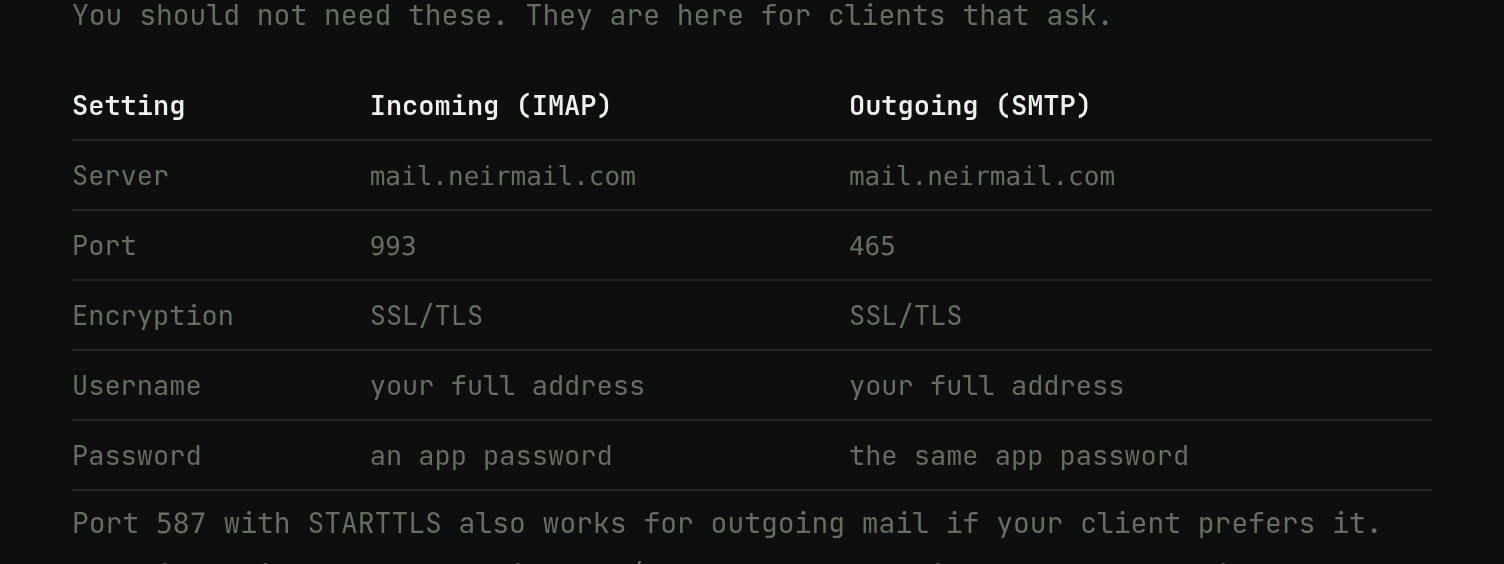
- Incoming (IMAP):
mail.neirmail.com, port993, SSL/TLS - Outgoing (SMTP):
mail.neirmail.com, port465, SSL/TLS, or port587with STARTTLS - POP3: port
995, SSL/TLS. IMAP is the better choice if you use more than one device. - Username: your full address. Password: the same app password for incoming and outgoing.
Neir does not accept unencrypted connections on any port.
Sending from a client on the Free plan
Every plan can receive mail in a client and send to other Neir addresses. Sending to addresses outside Neir is a Pro feature. On the Free plan your client connects and syncs normally, and only a message to the wider internet is refused, with an explanation. That is not a password problem, so there is nothing to re-enter.
What changes when you use a client
Mail clients need standard copies of your messages, so Neir keeps a conventional mailbox for IMAP and POP3 alongside the webmail copy that is encrypted to your key. Your client also stores mail on your device, so protect that device with a screen lock and disk encryption.
If a client will not connect
- Check that the username is your full address, including the domain.
- Generate a fresh app password and paste it without spaces.
- Make sure encryption is switched on.
Still stuck? Open a support ticket from your dashboard. The full reference is always at neir.io/mail-clients.
Photo: Norbert Levajsics on Unsplash.